Share this post
This is some text inside of a div block.
Copied!


Back to all posts
The recruiter only setting, the two week rule and everything else worth knowing


Published on
August 3, 2026
You have probably seen the green banner. Maybe you have thought about turning it on yourself and then talked yourself out of it. The Open to Work feature is one of those LinkedIn tools that seems simple on the surface but gets confusing fast once you start asking the real questions. Who actually sees it? Does it make you look desperate? Will someone I work with find out?
Here is what you need to know to use it well.
Open to Work is a setting on LinkedIn that tells the platform, and depending on your choice, either everyone or just recruiters that you are looking for new opportunities.
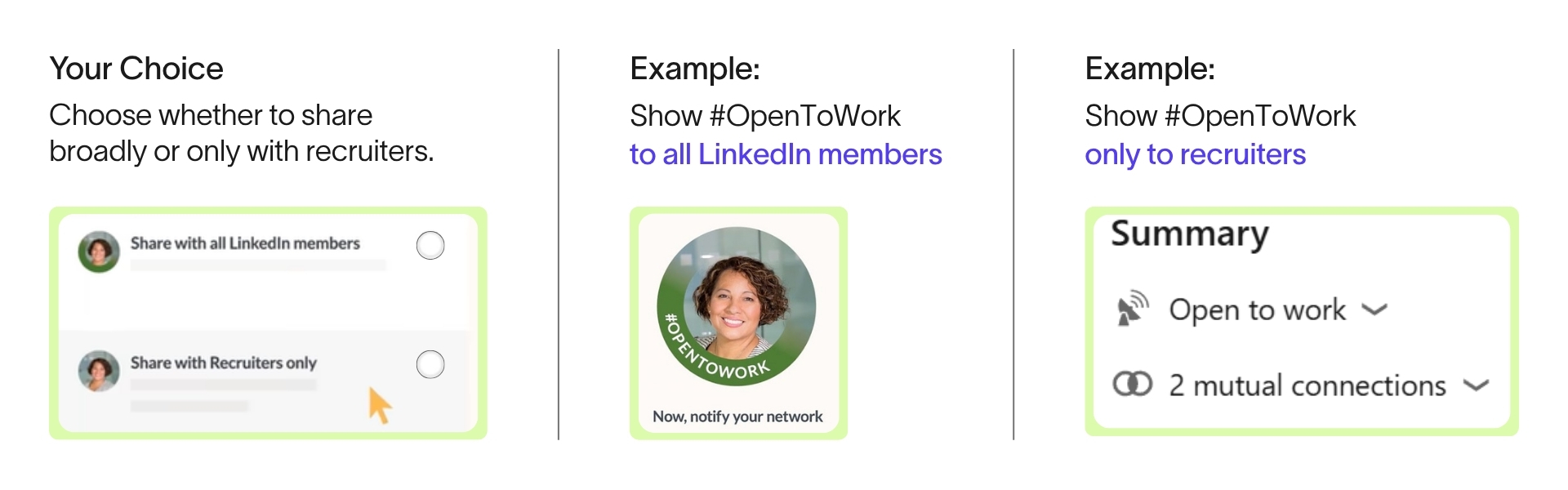
When you turn Open to Work on, LinkedIn asks you to choose between two levels of visibility.
The first option shares your status with all LinkedIn members. This is the version most people picture when they think of Open to Work, the bright green ring around your profile photo with the banner text underneath. Anyone who visits your profile can see it, and LinkedIn's algorithm tends to give these profiles a small visibility boost in recruiter searches and feeds.
The second option shares your status with recruiters only. If you choose this route, only people with a LinkedIn Recruiter license can see that you are open to opportunities, and it makes you appear in the filtered searches recruiters run when they are looking for active candidates. There is no green banner. Your profile looks completely normal to everyone else, including coworkers, your manager and your company's leadership team.
Either version can also change what LinkedIn shows you day to day. Once it is on, you will likely notice more job recommendations and recruiter messages showing up in your own feed and inbox, since LinkedIn treats the setting as a signal that you want to see that kind of activity.
The honest answer is that it depends on your situation.
Turning the banner on for everyone to see is a strong signal. It tells hiring managers and recruiters browsing LinkedIn that you are actively available and it can genuinely speed up how quickly people reach out. If you are between jobs, just graduated or your search is not a secret, this is usually the right call.
The recruiters only option is built for people who already have a job and want to explore quietly. LinkedIn does try to keep this information away from your current employer by filtering out recruiters at your own company, but it is worth knowing that this is a best effort, not a guarantee. If your company has its own in house recruiters using LinkedIn Recruiter, there is some chance they could still see it.
If you are a student or a new graduate who has not had a full-time role yet, the calculation is a little different. There is no current employer to worry about, so the public banner is usually the better choice, since the goal at that stage is maximum visibility rather than a quiet search.
It is also fair to mention that some hiring managers have mixed feelings about the public banner no matter how long it has been up. On the other hand, some hiring managers love the signal because it allows them to move faster and know intentions right from the get go. So a negative reaction is not universal, and in our experience it has much more to do with how long the banner has been sitting there than with using it at all.
Open to Work is meant to be a temporary signal, not a permanent setting.
Our recruiting team sees this play out often. A candidate turns the banner on, gets a bit of interest, and then forgets about it. Six months later the banner is still up, and it starts to work against them. A green Open to Work ring that has been sitting on a profile for half a year or longer tends to read as passive rather than active. Recruiters start to wonder why someone with a great profile has not landed anywhere yet, and the answer is usually just that they left it running and potentially forgot about it.
A good rule of thumb, and one our recruiters recommend directly, is to keep the public banner up for about two weeks. That is enough time to get visibility and generate interest without starting to look stale. After those two weeks, take the public banner down and switch back to sharing your open to work status with recruiters only. That way you stay discoverable behind the scenes without the visible signal sitting there indefinitely.
Small detail worth knowing. If you switch from the public banner to recruiters only, your profile photo goes back to normal immediately. Nobody browsing your profile will know anything changed.
On the LinkedIn mobile app, the steps are largely the same but the button lives in a slightly different spot. Open your profile, tap the "Open to" section just below your headline, and follow the same prompts to choose your visibility and enter your job preferences.
Once you land a role, or you simply decide you are done with the visible banner and the recruiters only setting behind the scenes, turning Open to Work off entirely takes a minute.
There is no way to keep just a piece of it running once you remove it. If you want to step away from the public version but keep the quiet recruiters only signal going, use the sharing options described earlier instead of removing it altogether.
Open to Work is a useful tool when you treat it like one, meaning you turn it on with intention and take it down with intention too. Use the public version for a short, focused window to create momentum. Then quietly keep the recruiters only setting active in the background so opportunities can still find you without your whole network watching. It is not a replacement for actually job searching. Think of it as a signal flare, not a full strategy — one piece of a search that should also include reaching out to people directly, applying to roles that connect and staying visible through the work you share on your profile.
How long should you keep the Open to Work banner up? About two weeks is a good target. That is enough time to get visibility with hiring managers and recruiters without your profile starting to look like it has been sitting stagnant for months.
Can my current employer see that I am open to work? If you choose the recruiters only setting, LinkedIn does its best to hide your status from recruiters at your own company. This is not a guarantee though, so if your company has internal recruiters on LinkedIn Recruiter, there is still some risk they could see it.
What is the difference between sharing with all LinkedIn members and recruiters only? Sharing with all LinkedIn members turns on the visible green banner and photo ring that anyone can see on your profile. Recruiters only keeps your profile looking completely normal and only shows your status to people with a LinkedIn Recruiter license.
Does leaving Open to Work on too long hurt your job search? It potentially can, but it depends. A banner that has been up for six months or longer often reads as passive rather than active, and recruiters may wonder why someone who looks available has not landed a role yet.
Is Open to Work enough on its own to find a new job? No. It is a helpful signal, but it works best alongside actively applying to roles, reaching out to people directly, and staying visible on LinkedIn through the content you share.
Do recruiters see Open to Work in search results, or only on my profile? Both. Turning it on, whether public or recruiters only, puts you into the filtered searches recruiters run for active candidates, in addition to showing on your profile if you chose the public version.
How do I turn Open to Work off completely? Go to the "Open to" button on your profile, select "Finding a new job," and click "Remove this." That turns off both the public banner and the recruiters only visibility at once.
Is Open to Work different for students or new graduates? Somewhat. Since there might not be a current employer, students and new grads usually benefit more from the public version, since the priority at that stage is visibility rather than a quiet search.

Altis is a Canadian-owned staffing firm supporting organizations across the private and public sectors. We focus on relationship-driven recruitment, clear process and consistent delivery, helping employers hire with confidence and professionals build meaningful careers.