Share this post
This is some text inside of a div block.
Copied!


Back to all posts
What professionals need to know about LinkedIn’s latest algorithm changes

Published on
August 10, 2026
LinkedIn advice has a short shelf life. The platform continually changes how it recommends content, measures performance and helps people discover new voices. A tactic that worked last year may be less effective today or may never have worked as consistently as people claimed.
What hasn’t changed is LinkedIn’s value as a career tool.
Your profile shows what you've done. Your activity can show how you think, what you know and what you care about professionally.
From a recruiter’s perspective, a strong LinkedIn presence won’t replace relevant skills or experience. But it can make it easier for recruiters, hiring managers and people in your field to understand what you bring to the table.
That’s the real goal. Not maximum reach. Relevant reach.
A post seen by the right 200 people can be far more useful than one seen by 20,000 people who have little connection to your work.
So how can you make LinkedIn work for you in 2026?
A note on the research: LinkedIn does not publish a simple formula for reach. Third-party studies can reveal useful patterns, but they show correlation, not guaranteed results. Results also vary by audience, industry, account size, topic and content style. Use this guidance as a starting point, then test it against your own audience, goals and analytics.
In March 2026, LinkedIn introduced a new feed system that uses large language models (LLMs) to better understand what a post is about and who may find it useful.
The platform looks at things like your industry, skills and experience. It also pays attention to what people read, react to, comment on or skip.
That means specific posts have a better chance of finding a relevant audience.
A post about managing a Dynamics 365 rollout gives LinkedIn more context than a broad post about leadership. A practical lesson from onboarding nurses is more useful than a general post about teamwork.
That’s because specificity helps LinkedIn understand your content, but more importantly, it helps people understand why they should read it.
Your profile should support the same story.
If you want to be known for project management, cybersecurity or public-sector recruitment, make those interests clear in your headline, About section, experience and activity.
Everything doesn’t need to match perfectly. You’re allowed to have more than one interest. But someone visiting your profile should still be able to get a clear sense of what you know and where you add value.
Read also: How to build a standout LinkedIn profile
You also don’t need a huge following.
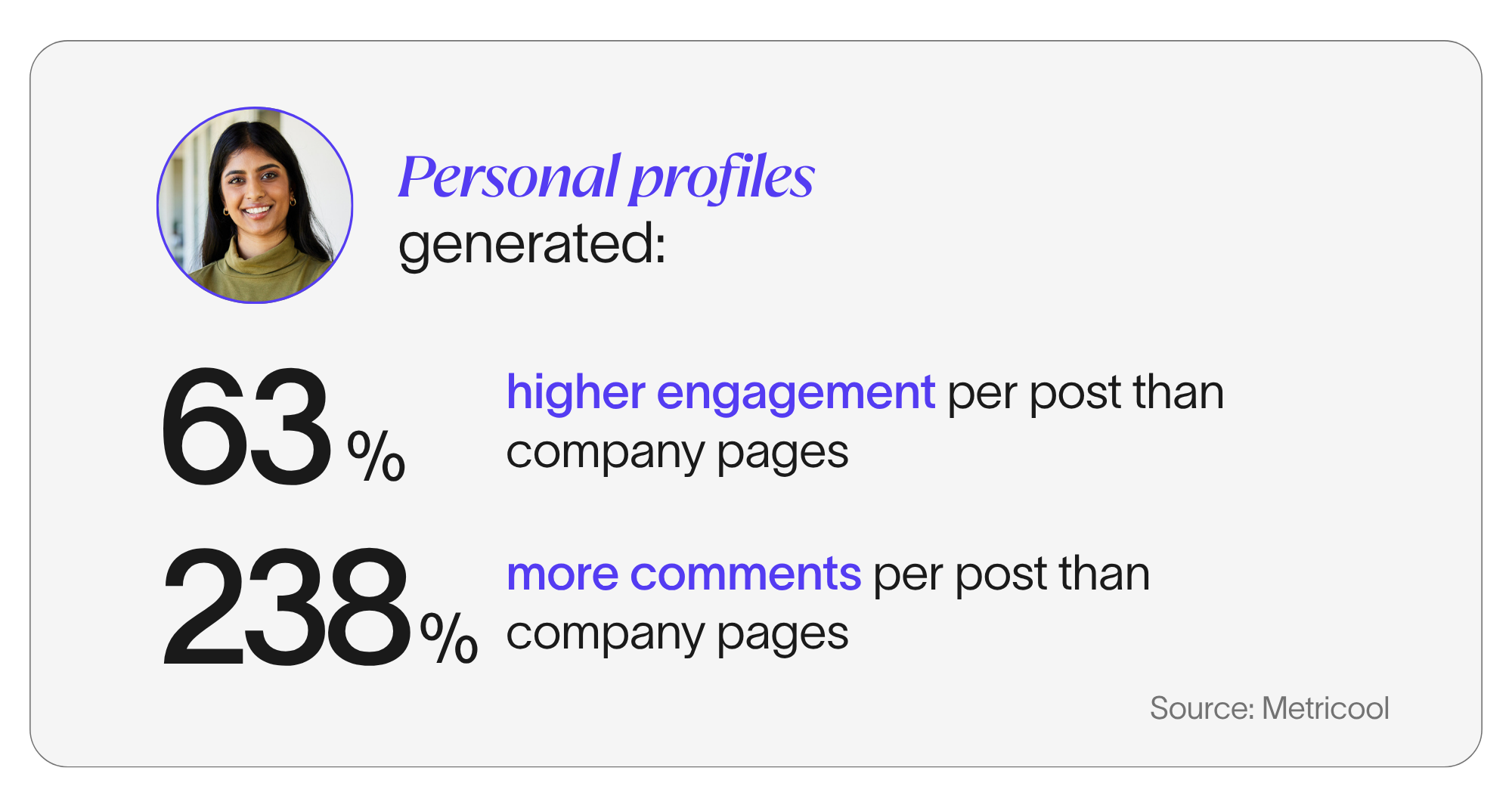
Metricool’s 2026 study found that personal profiles outperformed company pages on impressions and interactions across most account sizes. Profiles with fewer than 10,000 followers also generated more comments and stronger engagement than comparable company pages.
That’s good news for anyone starting from scratch. You don’t need a massive following to start meaningful professional conversations.
At the same time, competition for attention has increased. The State of the Algorithm: Q1 2026 report analyzed 397,605 posts and found that median impressions were 68% below their 2023 peak.
Its sample came from users of two creator-focused platforms, so it shouldn’t be treated as a universal benchmark. But it does reinforce an important point: broad reach is harder to earn and not always worth chasing.
The people seeing your content matter more than the number alone.
You don’t need to be an expert on a topic to contribute something valuable. Some of the most useful posts come from everyday work.
You could share a lesson from a recent project, a practical tip that saves you time or your perspective on a change in your field. You could talk about a skill you’re developing, a mistake you learned from or a process that helped your team work better.
For job seekers, this kind of content can give people a clearer sense of how you think.
A project manager might explain how they handled a shifting deadline. An administrative professional could share a system for managing competing priorities. A developer might walk through a decision from a portfolio project.
These posts do more than say you have experience. They show it. And that’s often what makes someone memorable.
A simple place to start is choosing two or three topics you want to be known for.
Think about the overlap between what you know and what would be useful to the people you want to reach. Then keep returning to those themes from different angles.
No need for a complicated content strategy. You just need enough consistency that people can understand what you care about and what you bring to your work.
There’s no single format that wins every time.
Metricool’s 2026 study found that carousels performed well for personal profiles and that multi-image posts had strong engagement. Other research has also shown good results for carousels and infographics.
We’re not suggesting that every idea needs to become a 10-slide document.
Here’s a good rule of thumb: Start with the idea, then choose the format that communicates it most clearly.
What are people posting on LinkedIn?
On personal profiles:
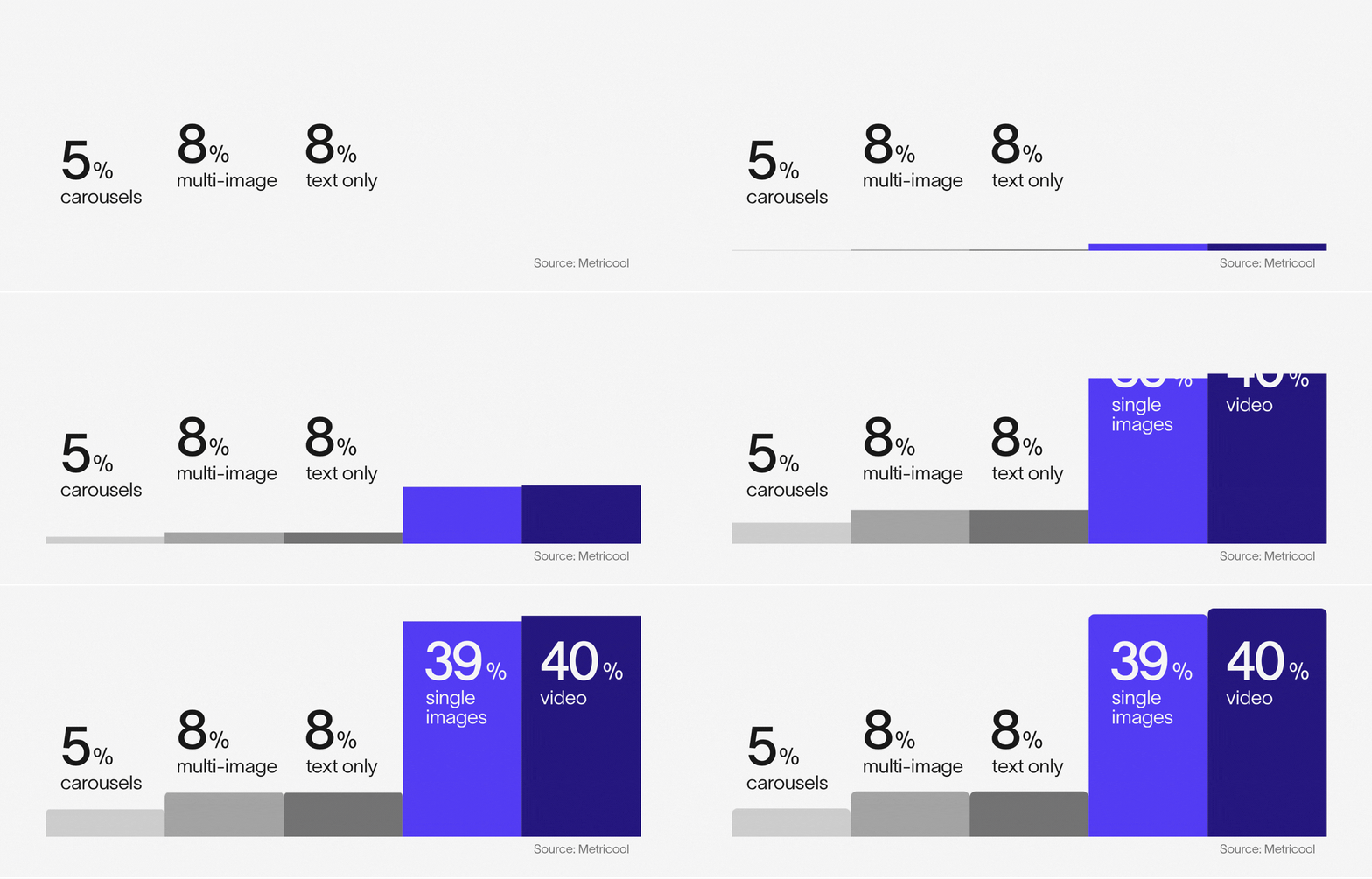
But the most-used formats aren't necessarily the best-performing ones. Carousels led on impressions while multi-image posts had the highest engagement rate. Source: Metricool 2026 LinkedIn Study.
External links are another area where the research is mixed.
Some studies found that posts with links received less reach. Others found that resource-heavy posts still performed well.
If a link helps the reader, include it. Just make sure the post is useful on its own and explain what someone will find when they click, especially if the link is behind a paywall that not everyone can access. Then review your analytics to see how your audience responds.
Good LinkedIn writing is clear, specific and sounds like you.
Use the first few lines to tell people what the post is about. You can create curiosity or tension, but you don’t need to build suspense for half the post. Share the point early, explain what happened and why it matters, include an example or result and give the reader something useful to take away.
Sharing real details makes a big difference.
Instead of saying communication is important, explain the weekly decision log that actually helps approvals move faster. Instead of saying adaptability matters, share how you adjust when a deadline suddenly shifts.
Those details make the post feel credible. They also make it harder for your content to sound like everyone else’s.
If the post could have been written by anyone with your job title, it probably needs another pass. Try including a specific situation, decision or lesson that only you can provide.
And when using AI to help you brainstorm, organize ideas or polish a draft, always remember that it should not remove the parts that make the story yours. Use AI as a support tool, not a substitute for your experience.
Invite conversation when it feels natural.
Ask a focused question that people can answer from experience.
Metricool found that posts containing a question received 77% more comments. That doesn’t mean every post needs to end with “Thoughts?”
Where appropriate, ask a specific question about your audience’s experience or point of view.
For example:
What has helped your team manage shifting project deadlines?
That gives readers a clearer reason to contribute something meaningful.
There is no perfect post length.
Several studies have found that posts longer than 1,000 characters can outperform very short posts. The Q1 report found strong results between approximately 1,250 and 3,000 characters. Other studies recommend keeping posts between 200 and 300 words.
Our advice? Write enough to make the point. Then remove anything that repeats it.
Try using short paragraphs, clear language and occasional bullets to make the post easier to scan. Read the draft aloud before posting. If a sentence feels stiff or unnatural when you say it, it will probably feel the same way when someone reads it.
A little.
LinkedIn is better at understanding the meaning of a post, so hashtags are not doing all the work they once did.
Still, Metricool’s research suggests that using at least one relevant hashtag may help with discovery. However, performance dropped as more hashtags were added. The Q1 report also found that using more than three hashtags hurt performance within its sample.
One to three is enough.
Choose hashtags that clearly relate to the topic and include keywords naturally in the post as well. There’s no need to add a long list of broad or decorative hashtags at the end.
Clear writing and useful content will always matter more.
It would be great if there was a universal best time to post, but studies can’t seem to agree.
Buffer’s July 2026 analysis found strong engagement from Wednesday to Friday, especially later in the day. Sprout Social’s data pointed to Tuesday through Thursday from late morning to late afternoon.
A practical approach is to use those windows as a starting point and test a few different times over several weeks to learn when your audience is active and most likely to respond.
Early engagement can help, but the first 90 minutes after posting are not your only chance to grab attention.
Metricool found that personal-profile posts received nearly 40% of their interactions on the first day and about half of their lifetime impressions within 48 hours. So there’s no need to monitor the post every five minutes. Publish when you can and check back later, respond thoughtfully and try to keep the conversation going.
The same applies to posting frequency.
Buffer found that posting two to five times per week was associated with stronger performance than posting once a week. For most professionals, one or two useful posts each week is a solid start. A pace you can maintain is better than posting every day for two weeks, burning out and disappearing for three months.
Commenting can help with visibility, but you don’t need to comment constantly.
Thoughtful commenting can be one of the easiest ways to join relevant conversations and show your perspective. Look for posts from people in your field — recruiters, hiring managers, colleagues, professional associations — and add something useful to their posts. You might share a related experience, build on the original point or ask a thoughtful question.
For example:
Your point about involving stakeholders earlier in the process matches what I saw on a recent implementation. Once we introduced a weekly decision log, approvals moved much faster. Have you found the same approach works on smaller projects?
That tells people something about your experience.
Writing “Great insights” is friendly, but it's generic and not memorable. It doesn’t invite conversation. Conversely, a long paragraph that simply restates the post or sounds AI-generated won’t help much either. Commenting works best when it feels like a real professional conversation.
So whether leaving comments on others’ posts or responding to those on your own content, the goal is the same: keep it natural, conversational and specific.
People respond to people.
Read next: Using commenting to increase visibility on LinkedIn
Not all engagement has the same career value.
Ten thoughtful comments from recruiters, hiring managers or peers in your field may matter more than 100 likes from people outside it.
Saves can tell you the content was useful enough to revisit. Sends and reposts suggest someone thought another person would value it. Profile views and new followers can show that the post created curiosity about you.
Those are often more meaningful than impressions alone.
Your own analytics will tell you more than any general study.
Look at which topics lead to profile visits, relevant connection requests and meaningful conversations. Pay attention to whether you’re reaching the roles, industries and locations that matter to you.
You can also track things LinkedIn does not neatly place in a dashboard, such as recruiter messages, referrals, interview opportunities and new professional relationships. This is where the real value often shows up. Review your activity over 30, 60 or 90 days and look for patterns. Which topics felt natural to write about? Which posts attracted the right people? Which formats encouraged saves or thoughtful comments?
Do more of what works, but don’t repeat the same post word for word every time.
LinkedIn will keep changing.
The good news is that you don’t need to rebuild your strategy every time someone announces an algorithm update. Focus on adding value, clearly and consistently showing what you know and staying connected to the people who matter to your career journey.
That will always be a better long-term strategy than trying to outsmart the feed.
Follow Altis on LinkedIn for more practical career advice and guidance on building your professional brand.
Not at all. In fact, this is where a lot of people get stuck.
You don’t need to have all the answers. You can share what you’ve learned, what you’re testing or what has worked for you without presenting it as the right approach for everyone.
A specific lesson from someone doing the work can often be more useful than broad expert advice.
Pay attention to what comes up during your workday.
What do colleagues ask you about? What did you learn the hard way? What process recently made your job easier? What change in your industry do you have an opinion on?
Those everyday moments are often your best source of content.
Keep a simple running note of ideas so you don’t have to come up with something from scratch every time you want to post.
Steal our ideas: Post Ideas for When You're Stuck
Don’t assume the post failed.
If you’re just starting, you may still be building an audience. The topic may have been a bit too niche or the right people simply may not have seen it.
Look beyond likes too. Did someone relevant visit your profile? Did a colleague mention the post later? Did one good conversation come from it?
Give yourself enough time to spot patterns before changing your whole approach.
As personal as you’re comfortable with, as long as there’s a reason for sharing it.
A career decision, difficult project or experience that shaped how you work can make a strong post. But you don’t need to share private details to be relatable.
Ask yourself what the story helps someone understand about you, your work or the lesson you’re sharing. If that connection isn’t clear, it probably doesn’t need to be a post.
Show the work instead of telling people how impressive it was.
Explain what you were trying to accomplish, the challenge you faced, what you did and what you learned along the way. Give people enough context to understand your contribution.
The example will usually speak for itself.
Use AI to support your LinkedIn strategy — to help you think, not to replace your point of view.
AI can help organize rough notes, suggest ways to structure an idea or clean up a draft. But add your own examples, opinions and language back in before you publish.
Then read the post aloud. If you wouldn’t actually say it that way in conversation, change it.
https://www.linkedin.com/blog/engineering/feed/engineering-the-next-generation-of-linkedins-feed
https://metricool.com/linkedin-trends-study/
https://buffer.com/resources/linkedin-algorithm/
https://buffer.com/resources/best-time-to-post-on-linkedin/
https://sproutsocial.com/insights/best-times-to-post-on-linkedin/
State of the Algorithm: Q1 2026, Saywhat and The Creator Accelerator (PDF report)

Altis is a Canadian-owned staffing firm supporting organizations across the private and public sectors. We focus on relationship-driven recruitment, clear process and consistent delivery, helping employers hire with confidence and professionals build meaningful careers.